Try EMX Controls for Free
Get started with EMX Controls for Avalonia UI in just a few minutes. We've prepared two simple ways for you to evaluate all the features of our components.
Trial Mode
EMX Controls packages are hosted on nuget.org. The trial period lasts 60 days and offers completely unrestricted library functionality. Without an active license, unobtrusive trial notifications will be displayed in the user interface.
Way 1. Ready-to-Use Demo Project from GitHub
The demo project contains ready-made examples showcasing all EMX Controls components.
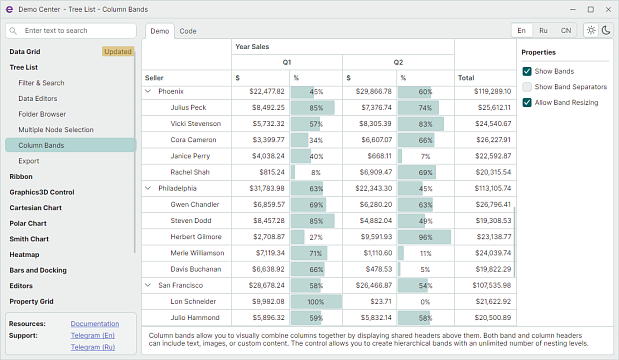
Download and run it as shown below.
1. Clone the Repository
Run this command in your terminal:
git clone https://github.com/Eremex/controls-demo
2. Run the Project
Go to the appropriate folder:
-
controls-demo\DemoCenter\DemoCenter.Desktop\ for the classic desktop version.
-
controls-demo\DemoCenter\DemoCenter.Web for the WebAssembly version.
Run the project with:
dotnet run
3. Reuse the Code
Open the project in Microsoft Visual Studio or JetBrains Rider to explore the demo source code. Find the example you need, copy its XAML/C# code into your own application, and use it as a starting point.
Way 2. Using Project Templates
This approach is ideal for starting a new application from scratch with pre-configured infrastructure.
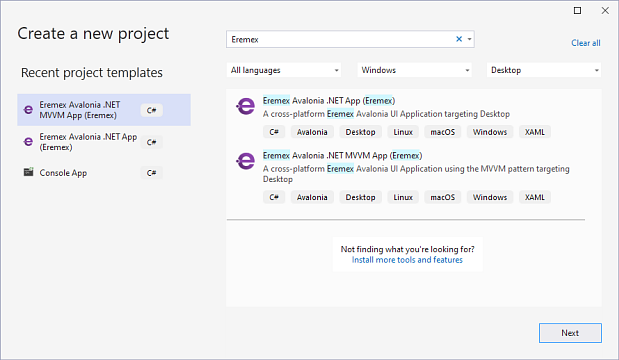
1. Install the Templates
Run this command in your terminal (only needed once if the templates haven't been installed earlier):
dotnet new install Eremex.Avalonia.Templates
2. Create a New Project
Generate your project (replace MyApp with your application name):
dotnet new eremex.avalonia.mvvm -n MyApp
3. Open and Configure Your Project
- Open the created project in Visual Studio or JetBrains Rider.
- The project already includes the EMX Controls packages and theme.
- Note that the main application window inherits from MxWindow, which supports theming.
- Important: Do not remove the pre-installed Delta Design theme. Without it, EMX Controls components will render blank.
4. Add Components in XAML
Add EMX Controls components to your page markup. For example, to add a DataGridControl (used for displaying tabular data), use this code:
xmlns:mxdg="https://schemas.eremexcontrols.net/avalonia/datagrid"

<mxdg:DataGridControl ItemsSource="{Binding Employees}" />
In this example, the DataGridControl is bound to the Employees collection.
You can find the complete example code here:
5. Run the Application
Run the project from your IDE. To run the app from the terminal, use the code below:
dotnet run
Helpful Resources and Support
Technical Documentation
- eremexcontrols.net — Comprehensive documentation for EMX Controls components.
Support Portal
- sc.eremexcontrols.net — Official ticket management system.
Developer Community on Telegram
-
https://t.me/emxControlsEn — English-speaking community.
-
https://t.me/emxControls — Russian-speaking community.